Second Roll is a learning tool for DailyGammon players who want to improve their backgammon skills. The app analyzes your past games on DailyGammon with the local Hedgehog backgammon engine, finds checker-play and cube-decision mistakes, and creates personalized quizzes to help you learn from them. Standard backgammon and Nackgammon matches are both supported.
Think of it as a personal backgammon coach that shows you the exact positions where you went wrong and asks you: “What would you do now?”
Second Roll has been designed with PC / Mac screens in mind. It works nicely on iPads/Safari. With other devices / browsers, you might need to scale the UI to fit your screen.
When you first open Second Roll, you’ll see a login screen asking for your DailyGammon credentials.
Important: Your login information is stored securely and is only used to fetch your games from DailyGammon.
After logging in, you’ll see three main buttons:
Need to change your login? Click “Update DailyGammon login” at the bottom of the home screen anytime.
When you’re ready to create quiz questions from your recent games:
The app will:
Checker plays are analyzed cubefully: the current cube value, cube owner, match score, and match length are part of Hedgehog’s evaluation. Cube decisions use match-aware equity as well, so the correct answer can change dramatically with the score.
This process can take time - analyzing matches thoroughly takes several minutes per game. The more days you select, the longer it will take. If you wish, go back by using the “Back to home” link in the top area, and select statistics to see how many quizzes have been added. As soon as a quiz has been added you can start quizzing, while more quizzes will be added in the background.
While the analysis runs, you’ll see:
This is the heart of the app. Click “Take the Quiz” from the home screen.
Checker play and cube handling are different skills, so the selector at the top of the quiz page lets you train them separately or together:
Your choice is remembered in the browser. If no active quiz matches the selected mode or filters, the page tells you instead of showing an unrelated question.
A checker-play quiz shows the dice and offers up to four moves: Hedgehog’s best move, the move played in the match, and useful alternatives where available. Hedgehog evaluates the moves cubefully rather than pretending that the doubling cube does not exist.
Cube quizzes always have two answers because the real decision is binary:
Second Roll checks for missed doubles before eligible rolls, evaluates doubles that were actually offered, and grades the opponent’s response. It respects cube ownership and the current cube value. There is no cube question for the opening roll, during a Crawford game, or whenever a player is not legally allowed to double.
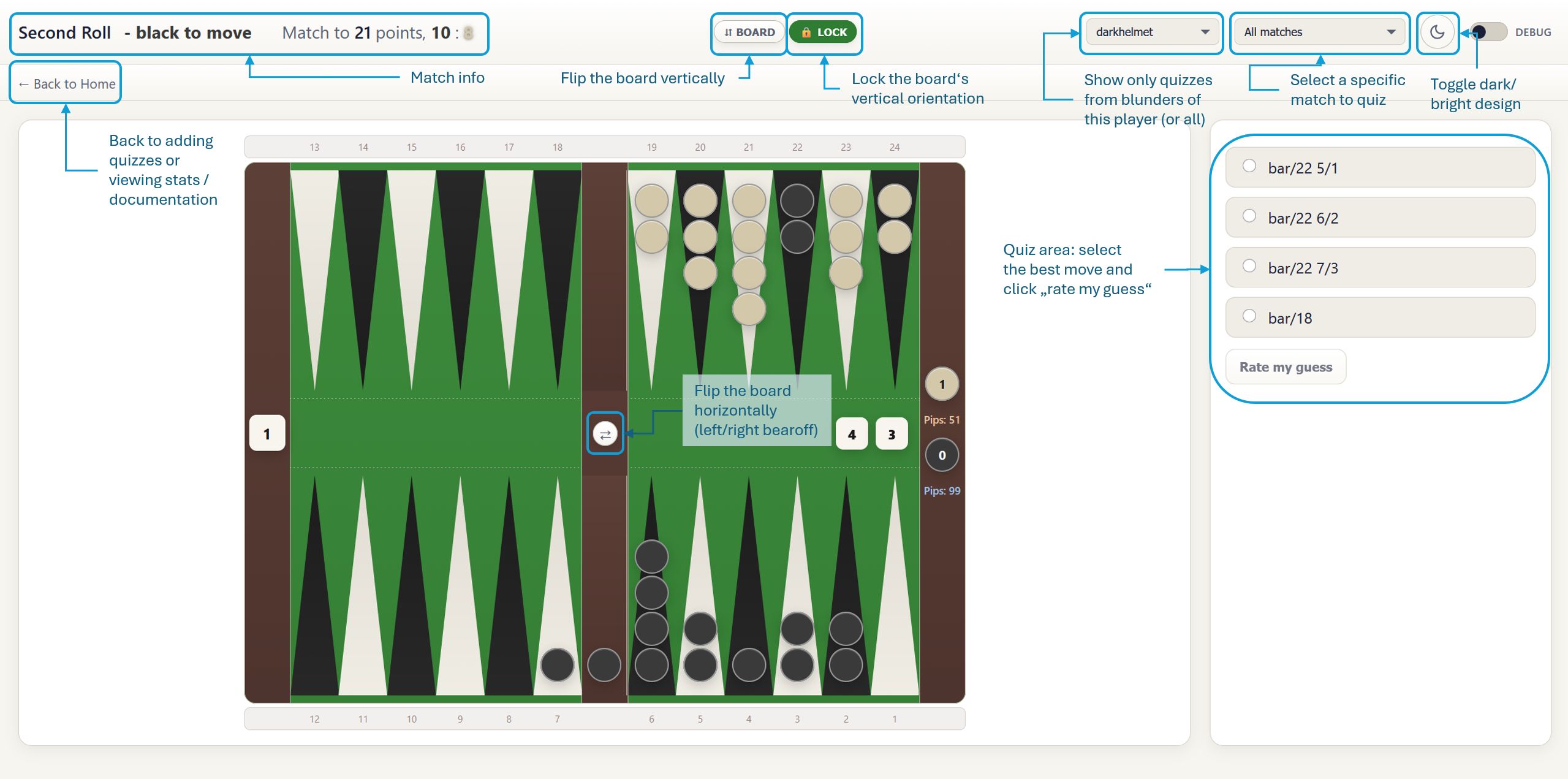
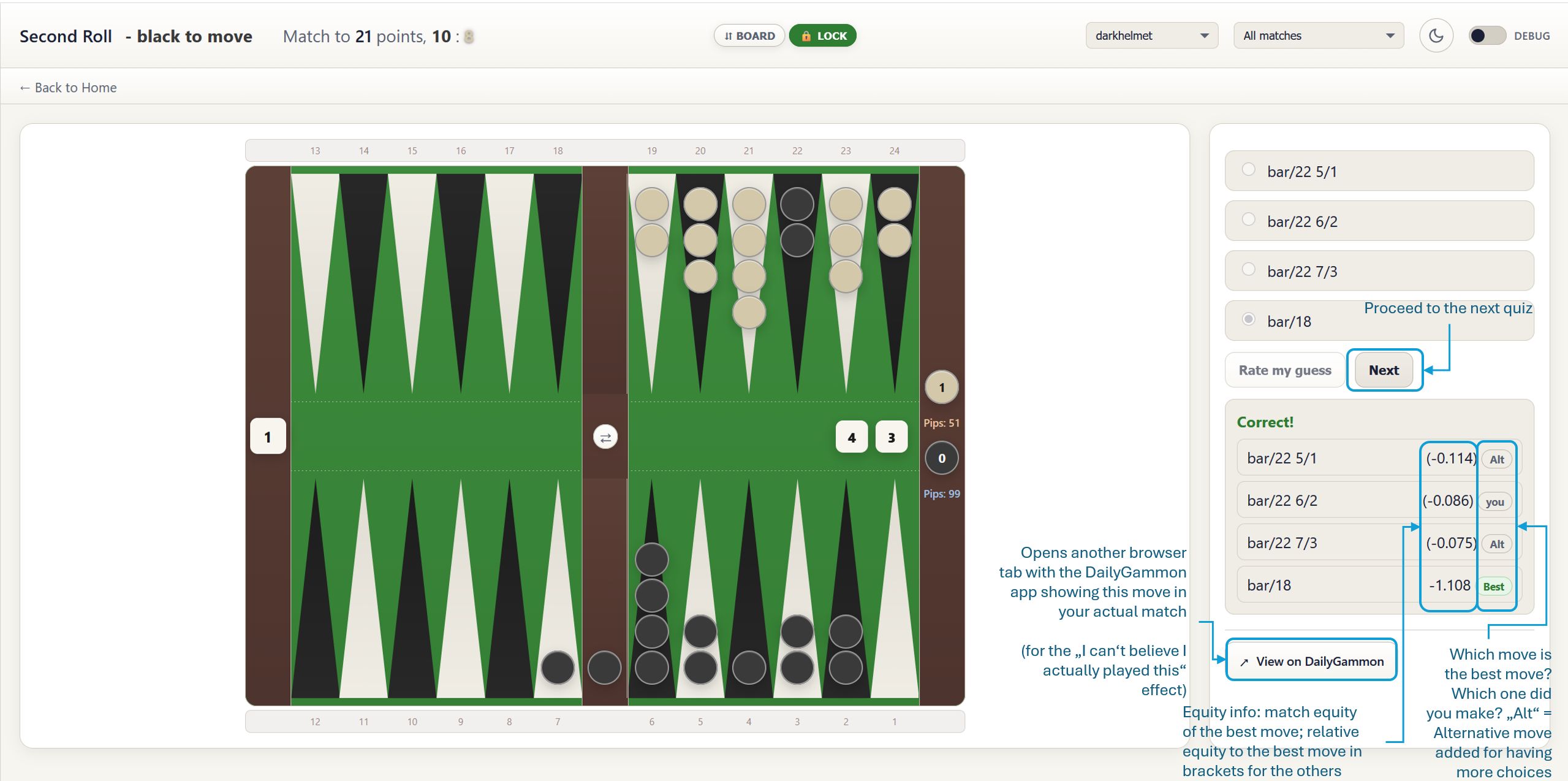
Click on the thumbnails to see the full size images. The images describe all the UI elements of the quiz interface.
When you open a quiz, you’ll see:
The board displays: - Blue checkers (Player 1) - moving clockwise - Red checkers (Player 2) - moving counterclockwise - Point numbers - Shown from the perspective of whichever player is on roll. - The bar - The vertical divider in the middle (where hit checkers go) - Bear-off area - Right side, showing how many checkers each player has borne off - Pip count - Total distance remaining for each player (lower is better) - The cube - Left side, showing the doubling cube value and who owns it
Board orientation tips: If the board orientation feels backwards to you, click the “⇵ Board” button at the top to flip it vertically (swap top and bottom rows). For a left-right mirror—swapping which side the points appear on—click the "⇄" button in the center strip of the board (between the dice and the two rows of points). Both settings are remembered for your next session.
After you submit your answer, you’ll see:
About equity: Positive values favor the player making the decision; negative values favor the opponent. The difference between two values shows the cost of choosing the weaker action. For match cube decisions, Second Roll uses Hedgehog’s normalized match equity so that a mistake is measured meaningfully even when raw match-winning percentages are close together.
After seeing the answer, a “View on DailyGammon” button appears. Click it to see: - The complete game this position came from - All the moves before and after this position - Your opponent’s name and the final result
This is helpful for understanding the context of the position.
After seeing the answer, select “Analyze on Hedgehog” to open the position in Hedgehog’s interactive Study screen. Scroll to the bottom of Hedgehog’s Edit position panel and select Apply to view the full analysis. You can then experiment with alternative moves, dice, cube decisions, models, and analysis settings.
For cube decisions, I found the score matrix particularly helpful. Click on "cube" and "compute" and it will show you the correct cube action for various match situations (e.g. 2-away/2-away).
Click “Next” to get another quiz question. The app uses a smart system: - Questions you answer correctly appear less frequently - Questions you miss appear more often - This helps you focus on positions that challenge you most
At the top of the quiz page, you’ll see a dropdown menu that holds your username.
Usually you will select your name there, to learn from your own mistakes.
But if you’re curious, or want to look at the mistakes of a specific opponent (maybe a very strong one) then select the respective name.
Note: The opponent list shows everyone you’ve played against in your analyzed games.
Next to the opponent dropdown, you'll see a second dropdown that lists your matches.
If you use second roll for a longer time, you will find the number of quizzes to be a bit overwhelming. You have hundreds of quizzes and won't come across the same quiz twice. Filter by match to focus on recent matches where you remember your decisions best.
Note: You can combine the opponent filter and the match filter—for example, pick an opponent first, then narrow down to a specific match.
Click “Statistics” from the home screen to see your progress.
Below your statistics, you’ll see a list of quiz positions that give you the most trouble. Each entry shows: - The best move for that position - Your success rate on that specific position - How many times you’ve attempted it
Why This Is Helpful: These are your weak spots! Click on any position to practice it again immediately.
Throughout the app, colors have consistent meanings:
The board automatically adjusts so the player on roll is always shown from their perspective.
Don’t analyze 60 days of games on your first session. Start with 7-14 days to get a feel for the app.
Taking a few quizzes daily is more effective than cramming. Make it part of your backgammon routine.
When you miss a question, try to understand why the best move is better. Look for patterns: - Is it about timing? - Is it about flexibility? - Is it about race calculations? - Is it about avoiding getting hit?
After seeing the answer, check the full game on DailyGammon. Understanding what happened before and after the position gives valuable context.
Review your statistics page regularly to see which types of positions trouble you most.
As you play more games on DailyGammon, run “Add New Quizzes” again to get fresh material. Your game evolves, so your mistakes will too!
The board uses the same orientation that DailyGammon shows when you're viewing the match. If you prefer it the other way, click the “⇵ Board” button in the header to flip it vertically, and the "🔓 Lock" button to lock it in that orientation. Additionally use the "⇄" button in the center strip to mirror it horizontally.
Every cube quiz has exactly two choices: double/no double or take/pass. Checker-play quizzes include Hedgehog’s best move, the move actually played, and up to two alternatives. If some checker moves are equivalent, you will see fewer distinct choices.
The analysis is performed locally by Hedgehog using a strong neural-network model. No computer is perfect, but the equity differences are reliable enough to identify significant mistakes. If you disagree, use the Analyze on Hedgehog button to explore the position and compare alternatives, or use another strong backgammon program for a second opinion.
If you want to compare the complete match in BGBlitz:
Quality backgammon analysis requires downloading each game’s complete move list, reconstructing every position, checking every eligible cube decision before the roll, comparing each checker play with its legal alternatives, and selecting useful quiz answers. Hedgehog performs all of those evaluations locally on the Second Roll server.
This thoroughness ensures you get meaningful learning material, but it takes time.
This means you don’t have any quiz questions yet. Click “Add New Quizzes” first to create questions from your games.
Select Cube decisions or Checker + Cube on the quiz page. Cube quizzes are created only for significant mistakes; the opening roll, Crawford games, and positions where doubling is not legal do not create cube questions.
Yes. Second Roll reconstructs the Nackgammon starting layout and supports both checker-play and cube-decision analysis. These quizzes are identified by a Nack Match label above the board.
Note: this is largely untested as I've yet to complete my first Nackgammon match.
Sorry, also not supported yet.
Because this is a multiple choice quiz :-) (I miss this feature as well, maybe someday…)
I am reusing the login mechanism of DailyGammon. This means that, given that DailyGammon's security is weak due to the use of HTTP, your data is as secure as your DailyGammon account.
This is normal and happens for technical reasons. The app redirects you to a special URL during authentication and quiz sessions to make sure your experience is secure and personalized. You don’t need to worry—this is expected behavior and does not affect your privacy or security.
Second Roll uses the local Hedgehog community engine for both checker-play and cube analysis. The neural-network model and search depths are configured by the server operator. The application default is the FOX v0.3 model with 2-ply checker and cube analysis. Individual users cannot change these settings, which keeps quiz evaluations consistent for everyone.
When you report a problem, I may ask you for the quiz ID. Turn on the debug toggle and a text field will appear showing the current quiz's ID. Copy and paste it into your email so I can reproduce the issue.
Here are terms used throughout the app:
Currently, the app does not support keyboard shortcuts. All interactions require mouse/touch input.
Second Roll works best in modern web browsers: - Chrome
- Firefox - Safari - Edge
Make sure your browser is up to date for the best experience.
Only you can see your quiz questions and statistics. Each user has their own private database of positions.
I am developing this app for fun, because I want to use it, and to give something back to the DailyGammon community. I am not interested in making money, and never will. I will not sell your data. The app will not show ads.
If you’re a total privacy nut and want to know for sure: have a look at the source code: github.com/kagsteiner/GreatestBGHits.
Second Roll is a vibe-coded application. I develop the whole app in conversation with OpenAI Codex and Cursor: I bring the backgammon knowledge, product ideas, production experience, and final decisions; Codex helps turn those conversations into working software.
This collaboration covers the complete project: the browser interface, server, database tools, DailyGammon integration, Hedgehog analysis, Nackgammon handling, cube-decision logic, automated tests, debugging, documentation, and deployment procedures. Features are discussed first, implemented incrementally, tested, and then tried against real matches. The cube trainer itself grew exactly this way—from a conversation about whether checker play and cube handling should be separate skills into a production feature.
“Vibe coded” does not mean nobody checks the result. I review the behavior, test it with my own matches, compare difficult positions with established backgammon software, and decide what reaches the production server. Codex helps investigate failures and write tests so that fixes remain fixed. The source code is public, so you can inspect both the result and the project’s continuing evolution.
I am aware of a controversy around vibe coded apps. But given I have a job (in software development) and a life, the only chance you can use this app as I've envisioned it before, say, 2030, is AI-assisted development. And honestly, AIs today are so powerful at coding that hand-crafting apps of this size is just stupidly wasting your time. Things change.
Remember: Every mistake is a learning opportunity. The positions in these quizzes are from your real games, which means they represent the exact situations where you can improve most.
Don’t get discouraged if your correctness rate starts low - that’s normal! As you practice, you’ll see patterns emerging, and your decision-making will improve.
Good luck, and may your blunders become victories!
This documentation is for the Second Roll backgammon training app. For DailyGammon support, visit dailygammon.com.
Responsible for this website pursuant to § 5 TMG:
Karlheinz Agsteiner
Email: secondroll@agsteiner.de
This is a private, non-commercial hobby project. It is provided free of charge, with no revenue, no advertising, and no commercial intent of any kind.
No warranty: This application is provided "as is" without any warranty, express or implied. The author assumes no liability for the accuracy, completeness, or usefulness of any information provided through this application, nor for any damages arising from its use.
Third-party content: This application interacts with DailyGammon, which is an independent service not affiliated with this project. Backgammon analysis is performed using the Hedgehog community engine. All trademarks and service marks belong to their respective owners.
Data privacy: This application stores only the data necessary for its function (DailyGammon username, quiz positions, and quiz performance statistics). No personal data is sold, shared with third parties, or used for advertising. See the Privacy & Data section above for details.
Source code: The complete source code is available at github.com/kagsteiner/GreatestBGHits.